
DataVeil 5.1 Intra-Column Parallelism
DataVeil version 5.1 has been recently released and is available for download at https://www.dataveil.com/my-downloads/
NEW: Intra-Column Parallelism
DataVeil has supported parallel masking since version 1.0, released in 2013. Until now, this parallelism has operated on the basis of only a single masking thread per column with multiple columns being processed concurrently.
This approach works well when a project contains many columns that take approximately the same amount of time to mask. In that situation, the available masking threads can usually remain busy because there is enough independent column-level work to process.
However, some masking projects are less evenly balanced. A project may contain one or a few very large columns, or columns using masks that take considerably longer to execute than others. In these cases, other masking threads may finish masking their assigned columns and then sit idle while the project waits for the remaining long-running column(s) to complete. In large databases, this final stage can sometimes add hours to the total project execution time.
DataVeil 5.1 introduces intra-column parallelism. This means that multiple masking threads can now operate concurrently on a single column. This enables DataVeil to divide the work for a large column across multiple threads and can significantly increase throughput and reduce overall project execution time.
Example: Before Intra-Column Parallelism
Consider the simple example shown below.
The following screen capture shows a masking project being run without intra-column parallelism, as would be the case in DataVeil versions prior to 5.1.
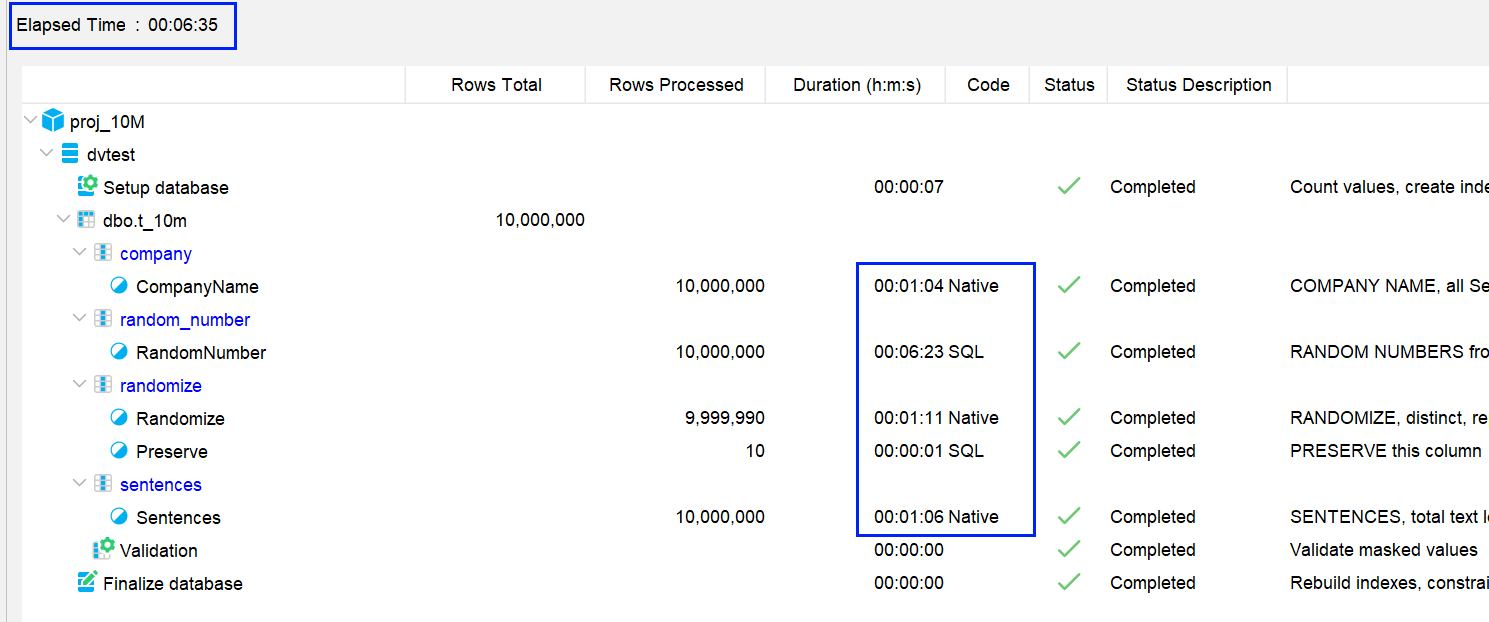
In this run, one column took 6:23 to mask, whereas all other columns completed within 1:11. Therefore, the project was effectively waiting for this one final column to complete after the other columns had already finished.
This resulted in a total project execution time of 6:35.
Example: With Intra-Column Parallelism
Now consider the same project being run with intra-column parallelism enabled in DataVeil 5.1.
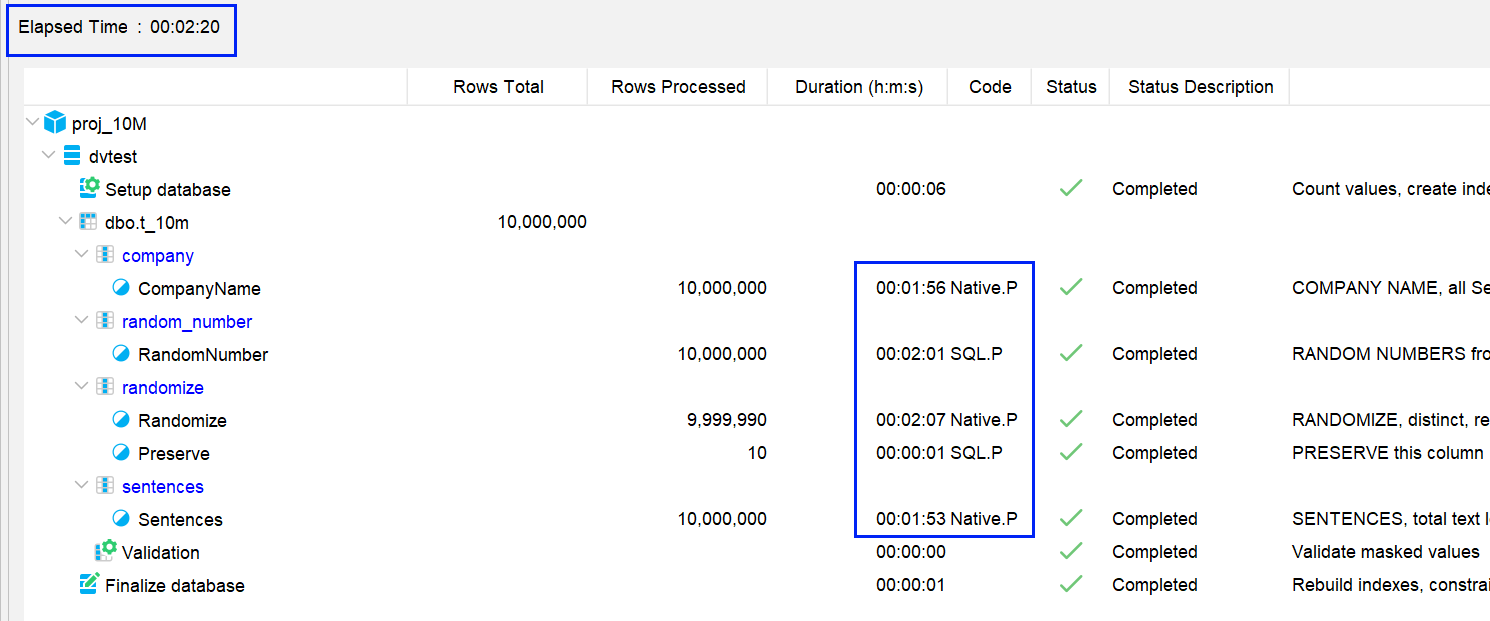
In this run, the slowest mask execution time was reduced from 6:23 to 2:01, and the overall project execution time was reduced from 6:35 to 2:20.
You may notice that some individual masks appear to take longer in the second run. This is expected in some projects. This is because the workload is being distributed more evenly across the available masking threads, so the timing of individual masks may differ even though the overall project completes much faster.
Although this example was measured in minutes:seconds, it could just as easily have been hours:minutes, and so the potential improvement in masking throughput is quite significant. Conversely, if a masking project already consists of evenly distributed worker threads then the improvement may be negligible.
Using Intra-Column Parallelism
New and existing projects will automatically have intra-column parallelism enabled as of DataVeil 5.1.
It is recommended to keep intra-column parallelism enabled; however, it can be disabled at:
Settings → Database → Execution
Intra-column parallelism relies on partitioning support in the database platform. If partitioning support is not available then intra-column parallelism will not be used.
DataVeil log messages will confirm whether intra-column parallelism is being used.
In the GUI Execution Control panel, the Code column will also show a .P suffix when a mask is using intra-column parallelism as shown in the second screen capture above. Therefore, you may see:
- SQL.P
- Native.P
This feature is available for the following database platforms and their relevant editions that support partitioning:
- SQL Server
- Azure SQL Database / Azure SQL Managed Instance
- Oracle
- PostgreSQL
It is not available for MySQL.
Mask Eligibility
Most masks and project configurations are eligible for intra-column parallelism.
However, intra-column parallelism will not be used for:
- Shuffle masks
- Number Sequence masks
- Masks in columns using the Column Duplicates option
- Quick Preview
The presence of a mask that is not eligible for intra-column parallelism does not prevent other eligible masks from using it. This also applies where eligible and non-eligible masks are used within the same column.
Intra-column parallelism applies only to the masked value generation phase. It does not apply to the write phase of a masking project.
Please refer to the DataVeil User Guide for further information on Intra-Column Parallelism.