Connecting to PostgreSQL
This section describes connection configuration details for DataVeil license type PostgreSQL.
DataVeil uses JDBC for connectivity.
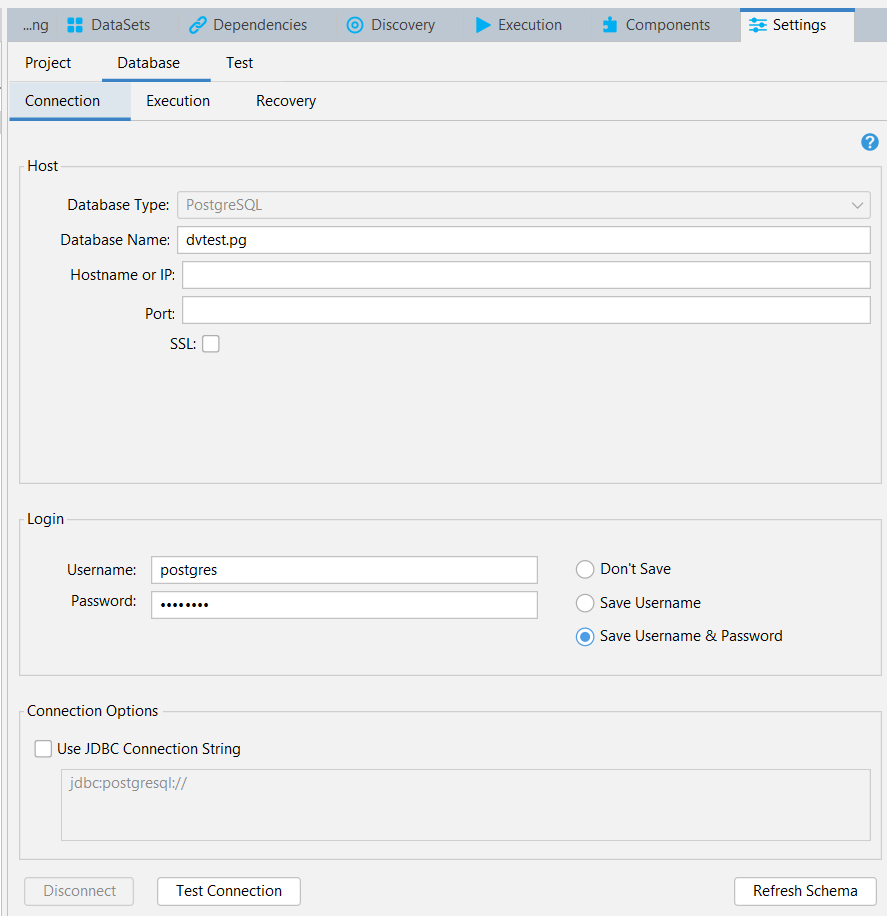
Database Type
This must be PostgreSQL for correct operation. This value is set when the Connection definition is created. After it has been created the value cannot be changed directly. This is why the field is disabled.
If there is a reason why this value must be changed, such as because the Connection definition was created using the wrong value by mistake, then the Migrate Masks function can be used to move to a new Connection definition.
Database Name
The name of the PostgreSQL database.
Hostname or IP
This can be a server name, an IP address or blank.
If the database is on the same computer where DataVeil is running then this field can be left blank.
Port
The TCP port where the connection shall be attempted. If left blank then the PostgreSQL default port shall be attempted.
SSL
If selected and the server supports SSL then the connection shall be established over SSL.
Use JDBC Connection String
When this option is selected DataVeil shall use the user-specified JDBC connection string to establish connections instead of using the other connection parameters on the form.
The only exceptions are the Username and Password fields. Although it is possible to specify username and password details in a JDBC connection string it is strongly recommended that you do not include these in the JDBC string. This is because they will be exposed as plain text and that presents a security risk. Instead, the username and password details should be specified in the corresponding Username and Password fields and omitted from the JDBC string. DataVeil manages the Password field securely and encrypts it whenever saved to a project file.
Other Parameters
Other execution parameters that apply to this connection, such as masking batch sizes and the maximum number of parallel JDBC connections (threads), can be specified in Execution Settings.